How to Read Quality and Style Targets in Dressmaker
A finished dress and a met customer target are two different things. The Dress Progress panel lets you check what this prototype displays before you choose Complete Commission.
Example A: both displayed targets are met
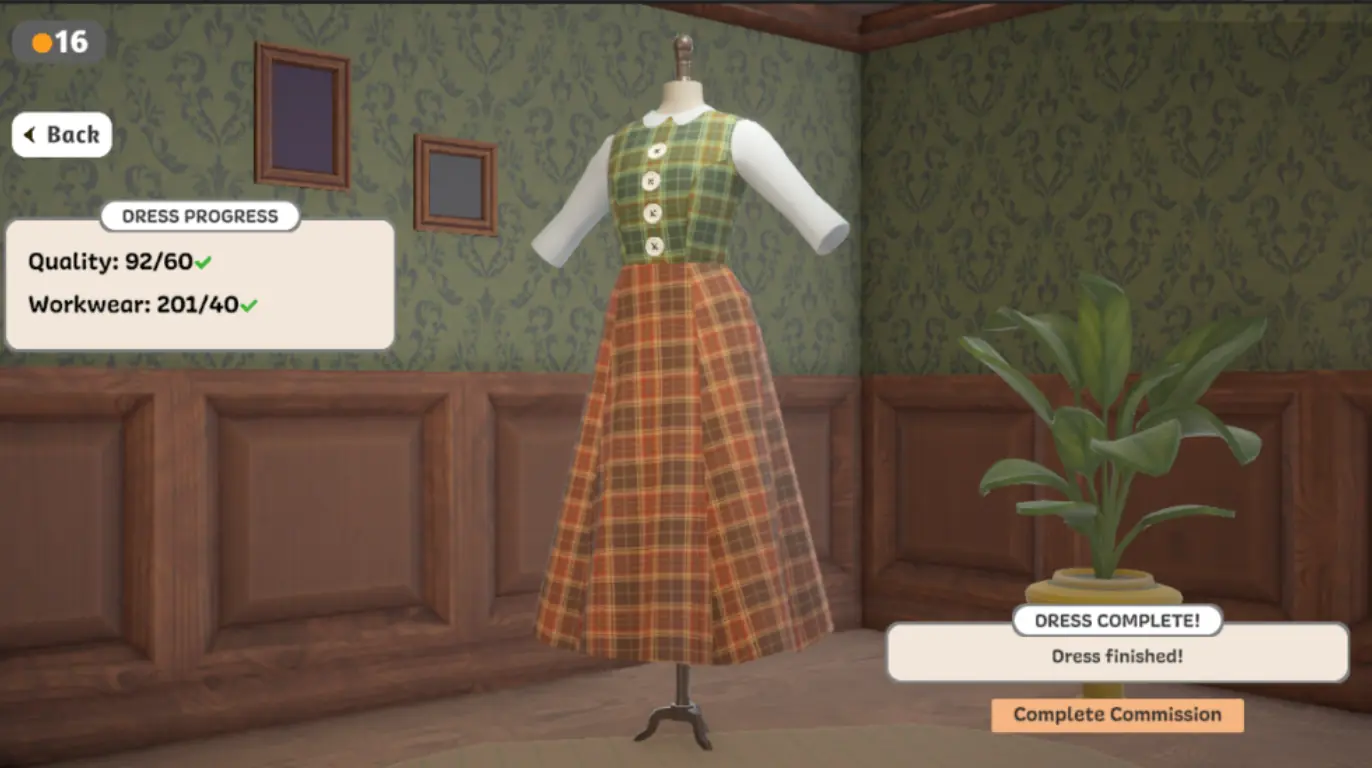
Read each pair as the displayed current value / displayed target. In this image, 92 is above the Quality target of 60, and 201 is above the Workwear target of 40. The green checks next to both lines agree with that reading. The panel is specific to this commission; another customer may ask for other style targets.
One thing to notice about this screen is what it does not contain. There is no combined total, no grade, and no commentary about why the values landed where they did. The panel gives you two independent measurements against two independent targets, and reading them as a single score is the fastest way to misread the result.
Example B: a dress can be finished below its quality target
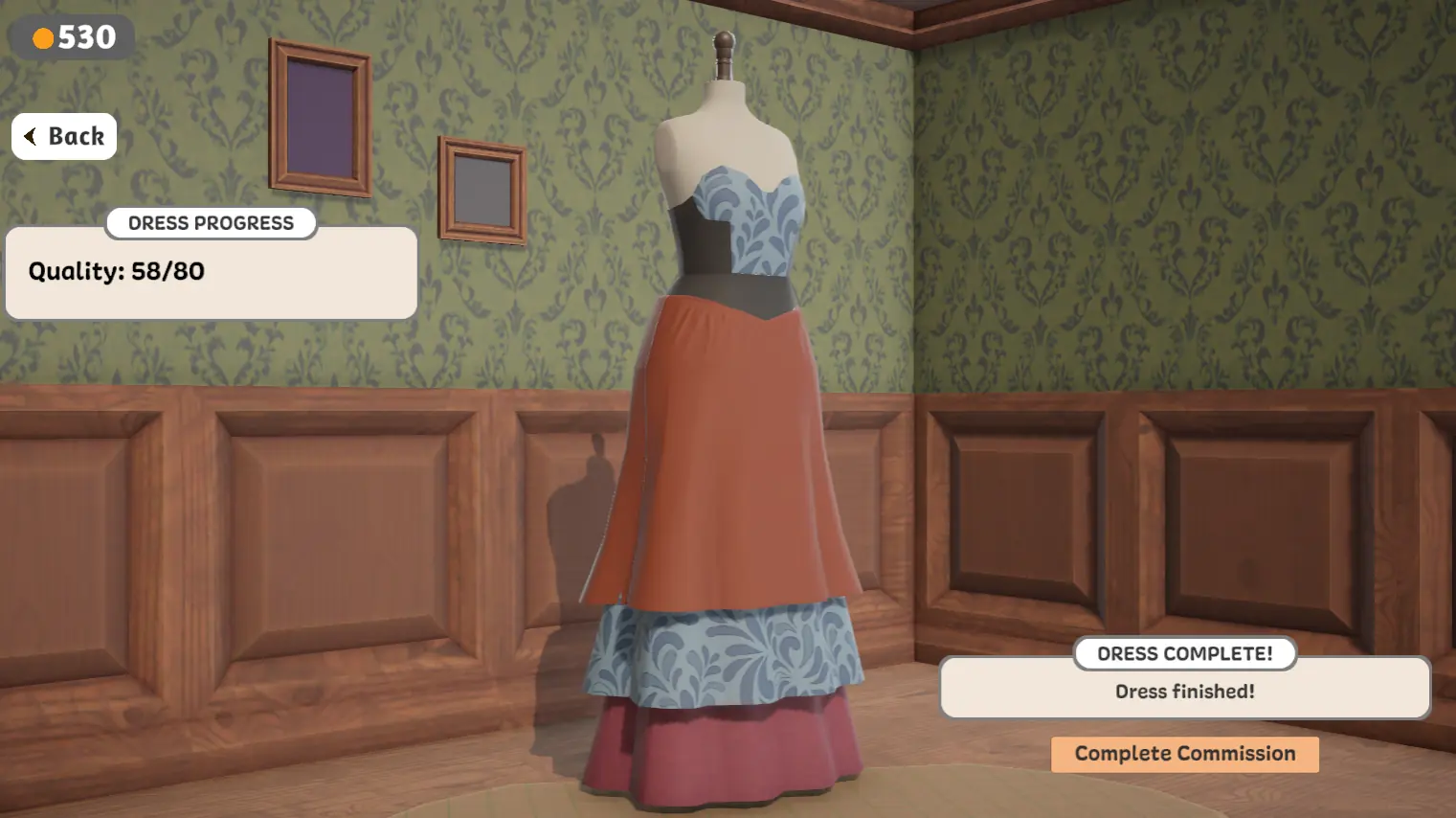
This second screen says Dress finished! and still shows a Complete Commission button. Its progress panel reads Quality: 58/80, without the green check visible in Example A. So the completion message tells you the making step is done; it does not, by itself, show that the displayed quality target has been met. The screenshot does not show the customer's final response, so do not infer one from it.
The gap here is 22 points. That number is worth writing down rather than remembering a general impression of the dress, because it is the only part of this result you can act on: you know which line missed and by how much, even though you do not know the formula behind it.
Which line is failing?
Because the panel lists each requirement on its own line, you can usually narrow a disappointing result down to one category before you start experimenting. In the two examples above, Example A satisfies both a quality target and a workwear target, while Example B shows only a quality line and it falls short.
- Quality fell short — the making stage is the place to look: pattern layout, cutting, and how closely you followed the sewing prompts.
- A style target fell short — the design stage is the place to look: silhouette, fabric choice, and whether the visible style tags still match the request.
- Both fell short — change one design decision and one making decision separately across two attempts, so you can still tell which one moved the number.
A useful result-check routine
- Before designing, record every requirement shown in the customer's brief or sketchbook. Rose's example shows Quality 60 and Workwear 40.
- When the dress is finished, read every line in Dress Progress, not just the completion message.
- Compare each current value with the target on the same line and note which lines show a green check.
- If a target is missing, record the gap. For example, 58 against 80 is 22 points below the displayed quality target.
- On a later attempt, change one design or making decision at a time. Keep your notes so you can see what actually helped in your build.
This routine is a way to learn from visible feedback, not a promise that a particular fabric or sewing move awards a specific number of points. For earlier steps, see the sewing and quality guide and the customer-request guide.
Why the numbers can shift between builds
Worth knowing if you compare notes with other players: the creators have changed how the game calculates parts of these requirements between versions. Their update notes describe a fix to colour and fabric-type scoring, including a boost for small components such as collars and sleeves, and they note that previously completed dresses can therefore display slightly different values afterwards. A score you read in one build is a score for that build.
Common questions
Does “Dress finished!” mean the order passed?
No pass result is visible in these screenshots. Check the displayed targets, then observe the outcome after you complete the commission in your own game.
Is Quality 60 the target for every dress?
No. Rose's pictured order asks for 60, while the other pictured dress shows a target of 80. Read the target for the order you are playing.
What happens if I press Complete Commission on a dress that missed its target?
These screenshots do not show the result of pressing it on a below-target dress, so we cannot tell you what the customer does. The button is offered either way, which means its presence tells you nothing about whether the targets were met.
Can a dress pass the style target but fail quality?
Yes. The panel lists the two separately, and they respond to different decisions: style targets follow the design, quality follows the making. A dress can look right for the brief and still be poorly constructed.
More Dressmaker guides
Last updated: 24 November 2026